Fix CI
A failing check blocks the pull request, so someone has to stop what they are doing, open the build, read the logs, reproduce the failure locally, write the fix, and push. Done once it is a minor annoyance. Done across a team all day it is a real tax: studies put the time lost to flaky and failing builds at a sizable share of an engineer's week, and that is before counting the focus it takes to get back into the work they left. Fix CI closes that loop automatically.
Overview
Fix CI is one of the standard use cases of the Agentic SDLC, delivered as a playbook you import and adapt. It is an agentic workflow that starts from a single event, a build going red on a pull request, and runs the loop a developer would otherwise run by hand. Its diagnosis step is a root cause analysis over the CI logs: read what failed, work out why, and name the files involved before changing anything.
What separates it from a generic "self-healing pipeline" is where it draws the line. Fix CI assumes the pipeline is correct and fixes the code on the branch to pass it. It does not edit CI configuration, and when the real cause is the pipeline rather than the code, it stops and tells a human instead of papering over the problem. It also never merges its own work: the agent pushes a green branch and explains the change, and a person approves the merge. That is the Overcut pattern in miniature, real autonomy on the task inside firm guardrails, with a human at the gate.
How it works
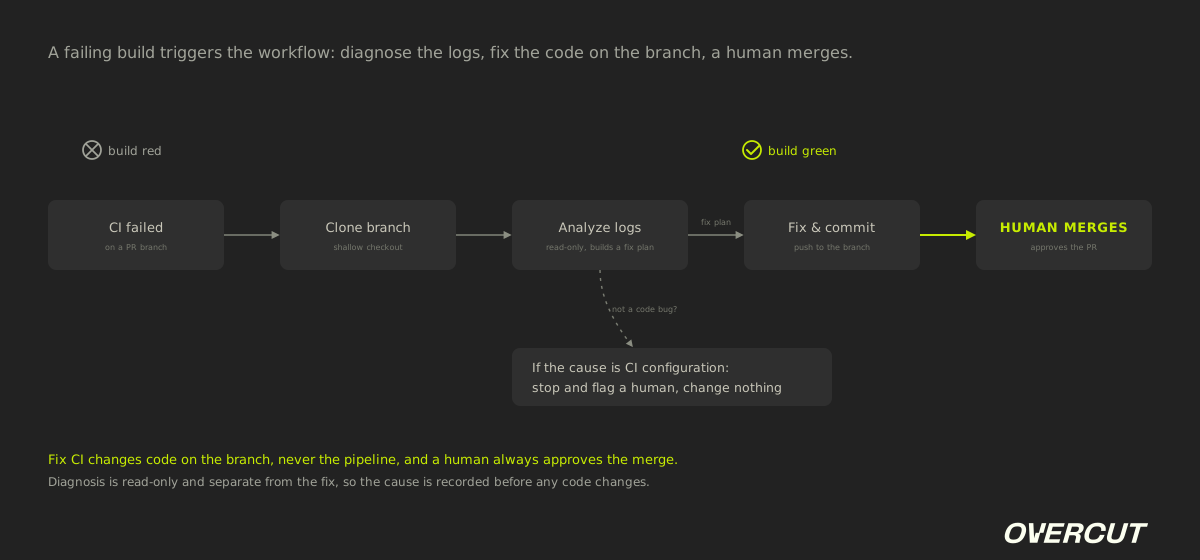
Fix CI runs as a short, bounded pipeline: detect the failure, diagnose it read-only, then fix and push. Four properties define it:
Triggered by the failure itself
The workflow is bound to the build-failed event on a pull request branch, or started on demand with a command. Work begins the moment a check goes red, rather than when an engineer happens to notice it and switches context to dig in.
Diagnose before touching code
A read-only step reads the run and job logs, works out which jobs failed and why, and produces a structured fix plan that names the files to change. Nothing is edited during diagnosis, so the analysis is a clean record of the cause.
Fix the code, not the pipeline
A second step applies the plan, verifies it, commits with a clear message, and pushes to the branch. It changes code on the branch only. It never edits CI configuration, and if the real cause is the pipeline itself, it stops and flags that for a human instead of guessing.
A human still merges
The agent gets the branch back to green and comments on the pull request with what it changed, but a person reviews the diff and approves the merge. Autonomy on the fix, human control at the gate.
Example in practice
An engineer opens a pull request that bumps a shared library to a new major version. CI goes red: three unit tests fail because a function signature changed. Instead of the author switching off their next task to investigate, the failed-build event triggers Fix CI. It clones the branch, reads the job logs, and sees the three failures trace to call sites that still pass the old arguments. It writes a fix plan, updates those call sites, runs the tests to confirm they pass, commits as fix(ci): update call sites for new signature, and pushes. It comments on the PR summarizing the change. The author comes back to a green build and a short diff, reviews it, and merges. They never left the work they were on, and nobody touched the CI configuration.
What is Fix CI?
Fix CI is an agentic workflow that detects a failing CI run, diagnoses the cause from the logs, and applies a fix to the code on the branch, then pushes the change for a human to review, so a red build is handled without someone dropping their work to debug it.
Comparison: Fix CI vs. the Manual debugging
Rerunning a build only helps when the failure was flaky, and manual debugging works but spends an engineer's focus; Fix CI handles the real failures in the background and leaves the merge decision to a person.
Stop babysitting red builds
Overcut ships Fix CI as a prebuilt playbook: it diagnoses a failing build, fixes the code on the branch, and hands you a green PR to approve, inside the guardrails you set.
Get a demoRelated content
By Overcut· 1 min read
Overcut named in the 2026 Gartner® Innovation Insight: AI Software Factories report
By Yuval Hazaz· 15 min read
Context Engineering: The Discipline Behind Reliable AI Agents
By Yuval Hazaz· 10 min read