
Isolated Execution Environment
When you hand a task to an autonomous agent, it needs to do real work: clone a repository, install dependencies, run the test suite, maybe rewrite a module. The question is where that work happens. Letting an agent operate directly against production systems is how a routine task becomes an incident. An isolated execution environment is the alternative: a walled-off workspace that gives the agent everything it needs to act, and nothing it could use to reach beyond the job at hand.
Overview
Human developers already work this way without thinking about it. You clone a repo to your laptop, run things locally, and push a branch. Production stays at arm's length, protected by the simple fact that your machine is not production. When an autonomous agent takes over that loop and runs without a person watching each step, the implicit separation a laptop provided has to be made explicit and enforced.
That is what an isolated execution environment provides. It sits between the agent and the systems it acts on, defining a hard boundary: the agent can read and change code freely inside the workspace, but production data, live credentials, and unrelated services stay outside it. This is what makes real autonomy safe to grant. Teams can let an agent move quickly on a task because the worst it can do is contained, and because every action it takes happens somewhere observable and reversible rather than against the live system.
How it works
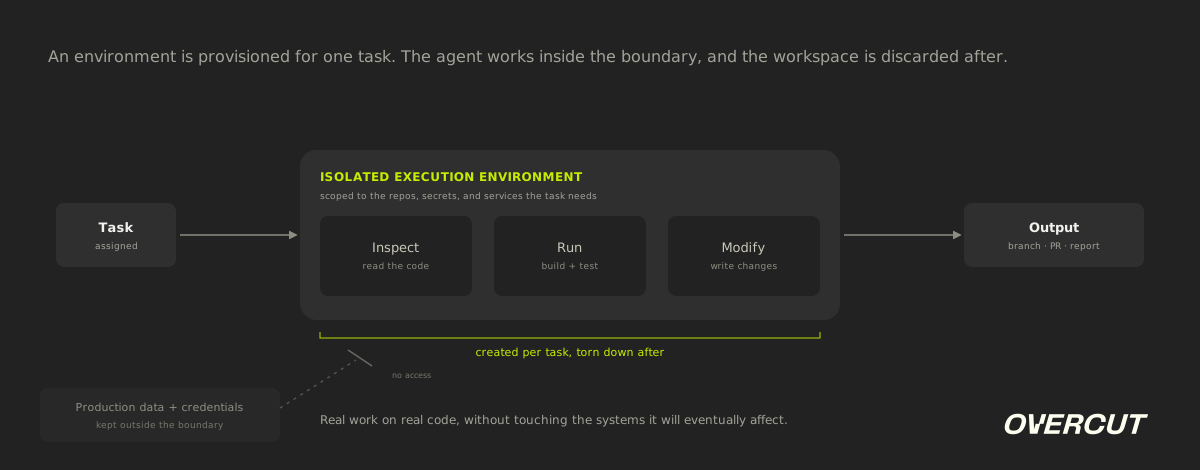
An environment is provisioned for a specific task, the agent does its work inside, and the workspace is discarded afterward. Three properties make the boundary meaningful: what the agent can reach, where its actions land, and how long the environment lasts.
Scoped access
The environment is provisioned with only the repositories, secrets, and services the task requires. Production credentials and live data stay outside its reach.
Contained execution
The agent runs commands, builds, and tests inside the boundary. Anything it writes or breaks is confined to the workspace, not the systems around it.
Ephemeral lifecycle
Each environment is created for a single task and torn down when the work is done, so nothing persists between runs and no state leaks across tasks.
Example in practice
A consultancy is asked to assess a client's aging payments service before a migration, but the client cannot let the source code leave their tenant. Instead of copying the repository out, an agent is given an isolated execution environment provisioned inside the client's own Azure DevOps project. There it clones the service, builds it, runs the tests, and produces a dependency and risk report. The agent reads and runs everything it needs, yet the codebase never leaves the client's controlled boundary, and the environment is destroyed once the report is delivered.
What is Isolated Execution Environment?
An isolated execution environment is a secure, self-contained workspace where an agent can inspect, run, or modify code without exposing production systems or data. The agent gets everything it needs to do real work, and nothing it could use to reach beyond the task it was given.
Comparison: Isolated execution environment vs. the Sandbox
A sandbox is about safety for experimentation, and a production environment is about serving real traffic. An isolated execution environment is purpose-built for the middle ground agents live in: doing real work on real code, repeatedly, without touching the systems that work will eventually affect.
Run agents without exposing your systems
Give every agent a scoped, ephemeral workspace, with production data and credentials kept out of reach.
Get a demoRelated content

By Overcut· 1 min read
Overcut named in the 2026 Gartner® Innovation Insight: AI Software Factories report

By Yuval Hazaz· 15 min read
Context Engineering: The Discipline Behind Reliable AI Agents

By Yuval Hazaz· 10 min read