Trigger
In a traditional pipeline, work starts because a person clicks a button or pushes to a branch. In an event-driven SDLC, that starting point becomes explicit and automatic: a trigger watches for a real engineering event and starts the right workflow the moment it happens. It is the entry point of the Agentic SDLC, the counterpart to the push or pull-request hook that kicks off CI/CD.
Overview
Engineering work is event-driven, not linear. A pull request opens, a build goes red, an issue gets labeled, a release window arrives. Each of these is a signal that some piece of work should run. A trigger is what turns that signal into action: it binds the event to a workflow so the workflow starts on its own, without a human standing by to launch it.
This is what lets autonomous agents work without a person in the loop at the start. Instead of one central controller dispatching jobs, each small workflow owns one concern and fires when its own conditions are met. The trigger is the binding that makes that possible, and it does more than say "go": it also carries the event's payload, so the workflow that starts already has the repository, branch, and context it needs to reason about the work.
How it works
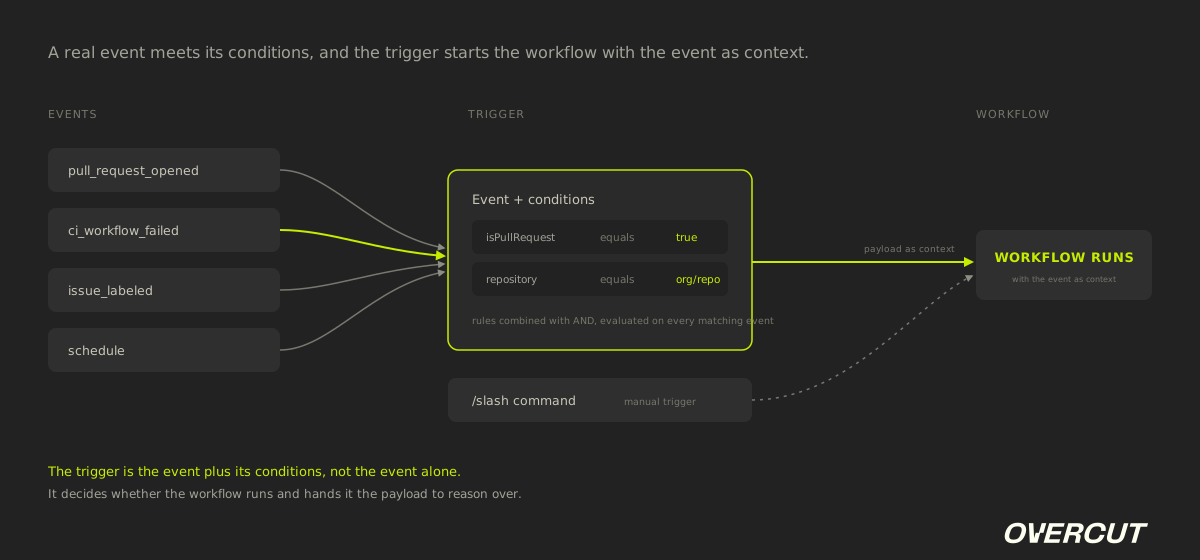
A trigger has two parts: the event or schedule that starts it, and the optional conditions that decide whether, given that event, the workflow should actually run. When the conditions match, the trigger hands the workflow a payload with the event data. Workflows reference that data downstream, for example a branch name or a repository, so the trigger is both the starter and the source of context.
Event triggers
Something happens in the development lifecycle: a pull request opens, CI fails, an issue is labeled, a comment mentions an agent. The trigger binds that event to the workflow that should react to it.
Schedule triggers
A time passes instead of an event firing. The workflow runs on a recurring clock, for routine sweeps like dependency upgrades or stale-branch cleanup.
Conditions
Optional rules filter the event so the workflow runs only when context matches. Each rule is a field, an operator, and a value, and the rules are combined with AND, so a trigger acts as a precise filter, not a blanket hook.
Manual triggers
A person starts the same workflow on demand by typing a slash command or pressing a button. Useful for testing a workflow or running it off-cycle.
Example in practice
Overcut's Fix CI workflow carries two triggers. The first is automatic: it listens for the ci_workflow_failed event, with a condition that the failing run belongs to a pull request. When a build goes red on a PR, that trigger fires the workflow, which clones the branch, diagnoses the logs, and pushes a fix. The second trigger is manual: a /fix-ci slash command runs the same workflow on demand. One workflow, two ways in, both defined as trigger blocks. The event the trigger captures is then available to every step as context, such as the branch and repository the fix should target.
What is Trigger?
A trigger is the rule that automatically starts an agentic workflow when a specific engineering event occurs and its conditions are met. It binds a real event, such as a pull request opening or a build failing, to the workflow that should run, and supplies the context that workflow reasons over.
Comparison: Trigger vs. the Event
People often conflate the event with the trigger: the event is the raw occurrence, the webhook is how that occurrence is delivered, and the trigger is the rule that decides whether the workflow runs and with what context.
Put your SDLC on event-driven autopilot
Overcut workflows fire on the events that already happen in your repo, with the conditions you set and a human in control at every gate.
Get a demoRelated content
By Overcut· 1 min read
Overcut named in the 2026 Gartner® Innovation Insight: AI Software Factories report

By Yuval Hazaz· 15 min read
Context Engineering: The Discipline Behind Reliable AI Agents

By Yuval Hazaz· 10 min read