Your Software Factory Needs a Budget: Introducing Usage Limits
Once AI agents do real work across more than one team, two questions show up that nobody asked when there was a single workflow on a single repository. How should the shared capacity be divided between teams? And what is the most all of this can cost? Both get harder as adoption grows, because workflows start triggering each other and most runs are started by webhooks and ticket labels, with no person watching.
Our customers have been asking both. One customer told us this month that the shared concurrency cap had become a real bottleneck as more of their teams and repositories came on board. A government buyer told us, before a pilot had even started, that open-ended AI consumption cost was the thing most likely to stop the deal at CIO level, whatever the product could do. Another team, halfway through an evaluation, rated the platform highly and in the same meeting asked us to do something about token spend right away.
They are asking the same thing in three forms. How do we let every team use agents freely without one team, one workflow, or one bad day deciding what everyone else gets?
Today we are releasing usage limits. Admins can now decide in advance how much capacity and how much model spend each team, project, workflow and model gets, and Overcut enforces those limits on every run without anyone watching a dashboard.
Key Takeaways
- Usage limits follow the structure your organization already has in Overcut (workspace, project, workflow and LLM model) instead of capping individual seats, because in an agentic SDLC the thing that spends is a workflow run, not a person.
- You can limit tokens, executions, and executions in parallel, over a day, week or month, or for a single run. When limits overlap, the strictest one applies.
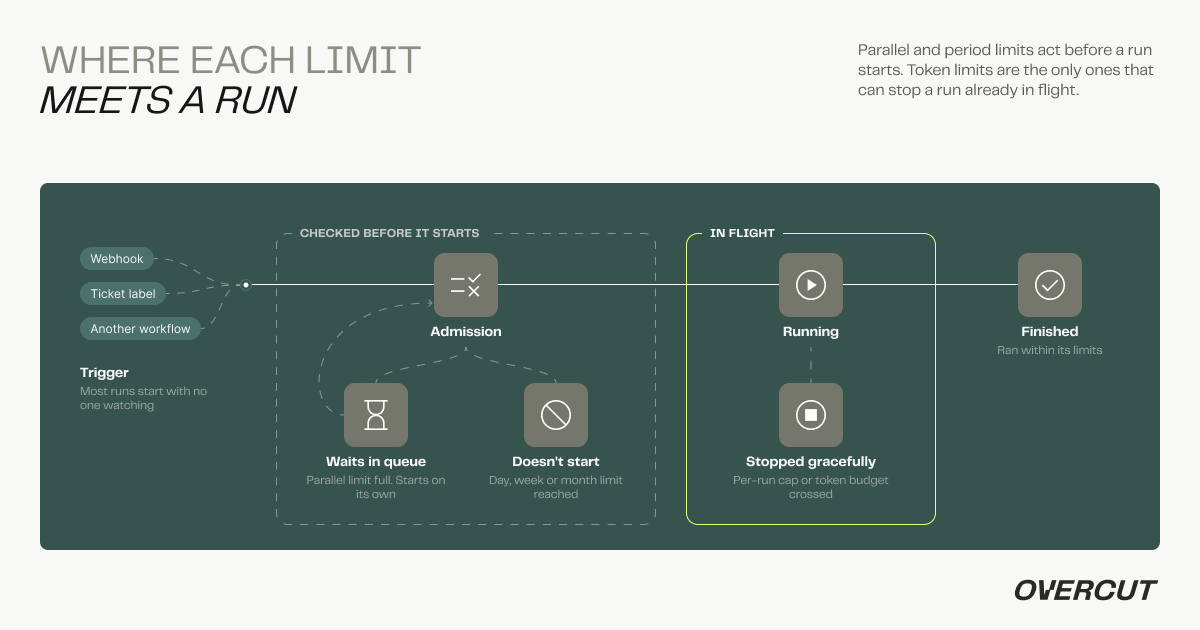
- A run that hits a limit waits in a queue, does not start, or is stopped gracefully, depending on which limit it hit, and it always says which limits stopped it and when they reset.
- For teams running agents unattended across many teams and repositories, Overcut is where that spend is decided and enforced, before the cloud bill arrives.
Success Is What Makes This Hard
Once agents are working across an organization, three needs show up, usually in this order.
Sharing capacity. Every workspace has a limit on how many runs can execute at once. With one team that is invisible. With ten, it becomes a shared resource, and shared resources get contended. The repository with the busiest PR traffic or the noisiest alerting can fill every slot, and everyone else's runs wait behind it. Nobody did anything wrong. The organization simply had no way to say how the capacity should be divided.
Containing one workload. Agent costs are uneven in a way that is hard to predict up front. A code review workflow that costs very little on a small service can cost many times more on a large monorepo. A webhook that was supposed to fire a few times a day fires a few hundred times. When someone finally runs the numbers, the only lever they have is the off switch, and turning the workflow off throws away the value it was producing for everyone else.
A number finance can sign. The people who approve the budget want to know the most this can cost before they agree to it. An answer of "it depends on usage" is a reasonable engineering answer and a poor procurement one. For regulated and public sector buyers in particular, a bounded cost is a requirement for the deal, not a feature request after it.
The AI tools most engineering organizations already use do have spend controls. GitHub Copilot lets enterprises set budgets per organization or cost center and stop usage when a budget runs out. Cursor has a team-wide spend limit. The Claude Console lets you set spend limits on a Claude Code workspace. These are good answers to a question about people: how much can each developer or each group of developers spend on their assistant?
An agentic SDLC raises a different question. The spender is a workflow run, started by a webhook, a ticket label, or another workflow, often at a time when nobody is looking. The unit you want to budget is a team's project, a particular workflow, or a particular model, and the bill for that model frequently lands on your own cloud account, because most of our customers bring their own Bedrock, Vertex, Anthropic or OpenAI connection. Overcut prices by workflow execution. The token bill is yours, and until now nothing inside Overcut could put a ceiling on it.
What We Shipped
A usage limit answers three questions: what to count, what it applies to, and over what period.
| Count | Applies to | Period |
|---|---|---|
| Tokens | Workspace, project or workflow | A day, week or month, or a single run |
| Tokens | An LLM model you connected | A day, week or month |
| Executions | Project or workflow | A day, week or month |
| Executions in parallel | Project | At any moment |
Days, weeks and months follow the calendar in your workspace's timezone, so a daily budget resets at your midnight, not at UTC's. A single subject can carry several windows at once. "One million tokens a day and twenty million a month on this project" is two limits, edited together, so one bad day cannot spend the whole month.
Every limit whose scope contains a run is checked, and the strictest one decides. There are no overrides. A project limit cannot grant capacity that the workspace limit above it denies, which is what makes the workspace budget the top-level limit for everything beneath it.

Limits live where people already look. There is a Limits page for the whole workspace, and a Limits tab on every project and every workflow that shows what applies there, including the limits inherited from above. The workspace's overall parallel limit, which comes with your plan, appears on the same page, so an admin sees every limit that is actually being enforced, not only the ones they created. Only admins can create, change or remove limits, and every change is recorded in the audit trail, because changing a ceiling on spend is a governance decision and should leave the same record as any other.
Sharing Capacity Between Teams
The most direct answer to contention is a parallel limit per project. If the platform team's project may run at most three workflows at once, a burst of activity there takes three slots and leaves the rest for everyone else.
A run that arrives when its project is already at its parallel limit waits in the queue rather than failing, and starts on its own when a slot in its project frees up, oldest first. Runs from other projects that do have room are not held up behind it. We made this a queue on purpose. Parallel capacity frees itself within seconds or minutes as runs finish, so the right response to "you're full" is "wait your turn", and asking a developer to re-trigger a run because three others happened to be in flight would be pointless friction.
Execution limits handle the other half of fairness, which is volume over time. A project or a workflow can be held to a number of runs per day, week or month. That suits teams that want to give a new workflow a trial allowance, or keep a scheduled workflow from being triggered far more often than intended by an upstream integration.
Capping a Workload Instead of Turning It Off
Consider a code review workflow that runs on every pull request in the organization. On most repositories it is cheap. On one large monorepo every review reads a great deal of code, and that single repository ends up responsible for an outsized share of the month's tokens. Without limits there are two options: absorb the cost, or switch the workflow off for that repository and lose the reviews.
Usage limits add the option teams actually want. A token budget on the workflow, per day, week or month, contains it without starving the rest of its project. A runaway workflow, whether from a webhook storm, a trigger loop, or simply being pointed at a much bigger codebase than it was designed for, uses up its own budget and stops there. A project-wide budget cannot do that, because by the time the project's budget is exhausted the one expensive workflow has already consumed what every other workflow in the project needed.
The per-run token cap protects against the other shape of the problem, which is one run that goes long. It says that no single run may cost more than a set number of tokens, and it can be set for the whole workspace, a project, or a single workflow. A run's cost does not exist until the run spends it, so this is the one limit that acts while a run is in progress. When a run crosses its cap, Overcut stops it the same way it stops any run gracefully: agent steps finish the operation they are in the middle of, steps that have not started are canceled, and anything still running after five minutes is terminated. A day, week or month token budget that fills up while a run is already in flight stops that run the same way.
A stopped run is marked as failed with a reason that says it was stopped by a limit, and that reason is different from the one used for a run that never started. The distinction matters to the person reading it later. A run that was never admitted did no work and cost nothing. A run that was stopped part way did some work, spent some tokens, and may have left a branch or a comment behind.
A Number Finance Can Sign Off On
The budget questions that come from finance and procurement map onto three kinds of token limit. A workspace budget is the overall ceiling. Project budgets divide that ceiling between teams, so each team's lead knows what their agents have for the month. A budget on an LLM model connection puts a ceiling on what Overcut can spend through one of your own model accounts in a period, which is the closest thing to a direct cap on the cloud bill you will receive.
The usage shown next to each limit is the same figure Overcut checks when it decides whether a run may start. We cared about this more than about almost anything else in the feature. A limits page that shows one number while enforcement acts on another is worse than no page at all, because the first time a run is refused at "60% used", nobody trusts either number again.
Because limits only ever tighten as you go down from workspace to project to workflow, the configuration also reads cleanly in a review. A finance partner can read the workspace budget as the ceiling Overcut enforces for the whole workspace, whatever any project sets beneath it, within the small margins described under what limits don't do yet.
When a Run Hits a Limit
Most of the people who meet a limit did not set it. A developer opens a ticket, the triage workflow does not run, and they want to know why. So a run that is stopped by limits explains itself in its status, naming every limit that applied rather than only the first one found:
This run is over 2 limits. Project Core Platform has used 20,000,000 of 20,000,000 tokens, resets 1 Nov. Workflow nightly-sync has used 50 of 50 executions, resets 20 Oct. Trigger it again once there is room, or raise the limit.
Naming all of them is deliberate. A run can be over its project's monthly budget and its workflow's daily allowance at the same time, and a message that names only one sends an admin off to raise a limit that still would not let the run through. Reset dates are shown in the workspace's timezone, so "resets 20 Oct" means the date the person reading it will actually see.
Two smaller decisions round this out. On a project or workflow's Limits tab, an admin can edit that scope's own limits in place, while limits inherited from the workspace are visible but read-only there, because changing a workspace budget from inside one project affects every other project and that page cannot show the consequences. And when someone sets a limit that can never take effect, such as a project budget above the workspace budget that contains it, the form tells them it will save but will never be the limit that stops a run. It warns rather than refuses. In practice these conflicts come from two admins setting sensible numbers weeks apart, and a deliberately redundant limit is sometimes exactly what someone wants.
What Limits Don't Do Yet
Limits do not send alerts yet. Each limit has a warning threshold that turns its usage bar amber on the Limits page, and that is all it does today. Email and Slack alerts for approaching or reaching a limit will come through Overcut's notification system, the same one every other kind of alert will use.
Per-run caps can overshoot slightly, and by how much depends on the engine. Overcut can only stop a run at a point where it has seen the run's usage. On the Overcut engine, usage is reported after every model call, so a run is stopped within roughly one call of its cap. On the Claude Code engine, usage is reported when a step finishes, so a run can pass its cap by up to one step before Overcut sees it. That is why the product describes a per-run cap as "around" a number.
Model budgets apply to model connections your workspace added itself. The platform's built-in models are shared infrastructure and cannot be budgeted per workspace this way.
If Overcut cannot evaluate a workspace's limits at the moment a run is triggered, for example during a brief outage in the service that tracks usage, the run goes ahead. We chose this deliberately. Failing closed would turn a short internal outage into every team in every workspace being unable to run anything, and a short overspend against a budget is the smaller harm. It is still a gap, and it means limits are a strong control, not an absolute one.
Where This Goes
The next step is the notifications layer: warnings as a limit approaches, sent to the people who own the budget, including a finance alias that may not be an Overcut user at all. After that, we want Overcut to suggest sensible starting numbers from each workspace's real usage, so that setting a first budget starts from a proposal instead of a guess. Customers have also asked for a single view of everything running and queued across the whole workspace, and that is close behind.
The larger point is one we made when we wrote about why Overcut builds the run and control layers. Autonomy that an organization cannot bound is autonomy it will eventually switch off. The questions enterprise teams ask us about AI agents are almost never about whether an agent can do the work. They are about who decides what it is allowed to do. Usage limits put cost in that same category. The organization decides in advance, in the structure it already uses, how much its agents may spend and how much of the shared capacity each team gets, and the platform keeps to it on every run.
FAQs
Does a limit stop a run halfway through? Only token limits do, because they are the only ones a run can cross while it is running. A per-run cap, or a day, week or month token budget that fills up during the run, stops it gracefully: agents finish their current operation and the run ends within a few minutes. Execution and parallel limits are checked before a run starts, so they never interrupt work in progress.
What happens when a team hits its parallel limit? New runs for that project wait in the queue and start automatically, oldest first, as the project's running workflows finish. Nothing needs to be re-triggered, and other projects with free capacity keep running normally. Day, week and month limits behave differently: a run over one of those does not start, because the window will not free up in minutes.
Can a project lead raise their own budget? No. Only workspace admins can create, change or remove limits, and every change is recorded in the audit trail. Admins can also give other roles read access, so team leads can see the limits that apply to their projects and workflows, including the workspace limits above them, and know what they are working within.
Do limits apply to my own Bedrock or OpenAI models? Yes. A token budget can be set on any model connection your workspace has added, over a day, week or month. It counts only your workspace's usage through that connection, which makes it the most direct way to bound the bill you receive from your model provider.
What happens if I don't set any limits? Nothing changes. Without configured limits, runs behave exactly as before and Overcut does no extra work when a run is triggered. Your plan's workspace-wide parallel limit still applies, as it always has.