Many Processes, One Plan: Introducing Parallel Orchestrations
A real project moves on several fronts at once, and someone keeps those fronts on one plan. They decide what can start next, notice when one part stalls, and make sure the pieces still fit together at the end. Our orchestrations carried one process at a time. Give one a ticket and it plans, implements, reviews and verifies, with a supervisor deciding each next step and people holding the gates. Hand it fifteen tickets and they waited in line, even the ones that had nothing to do with each other.
Today we are releasing parallel orchestrations: many processes, one plan, all moving at once. One orchestration can now run up to five workflows side by side, each on its own piece of the work, with the supervisor in charge of all of them. A new Graph view shows that work on one live canvas.
Key Takeaways
- An orchestration instance can run up to five workflows at the same time. Set Max parallel steps in the orchestration settings. The default stays at 1, so nothing changes until you ask for it.
- Work runs in lanes. Each lane is one unit of work, such as a ticket in an epic, and each parallel step gets its own brief. The supervisor assigns lanes and decides when to continue.
- The Graph view shows every lane, every step and who resolved each decision, so concurrent work stays readable.
- On a real 15-ticket epic in our own product, this put 18.2 hours of workflow time into 9.7 active hours. Almost all of the remaining time was the orchestration waiting for a person at a gate.
Running Agents in Parallel Is the Easy Part
Starting several agents at once is close to a solved problem. Claude Code runs subagents in their own context windows, and plenty of teams keep a handful of sessions going in separate worktrees. If you have one developer and a few well-separated tasks, that works well.
The difficulty moves elsewhere once the work is unattended and spans a whole epic. Someone has to decide which tickets are free to start, keep two steps from stepping on the same ticket, react when one finishes while three others are still going, and leave a record a person can follow the next morning. Choosing what each agent should do, and working out afterwards which one caused a failure, takes more effort than starting them.
That is the work an orchestration already does for a single ticket. So we did not add a separate way to fan out. We taught the supervisor to hold several threads of work at the same time.
What We Shipped
Set Max parallel steps above 1 and the supervisor can start several workflows in one decision. Each one runs in a lane with its own brief. A lane usually maps to one work unit, and you tell the supervisor how to split the work and name the lanes in Goal & Instructions, in plain language. Our own orchestration says that every ticket is a lane, and that two steps never run in the same lane at once.
After starting work, the supervisor chooses how to wait. With all, it continues once every selected step has ended. With any, it continues as soon as one does, routes that lane, and can start more work while the others keep running. Most long epics want any, because a finished ticket should free its slot right away. The choice belongs to the supervisor, and your instructions steer it.
Everything that held for a single thread still holds. A gate still stops the work until a person answers on the issue. Max repeats per workflow now counts separately in each lane, so one stubborn ticket cannot use up the allowance of the others. If you need to stop one lane, a targeted stop cancels that step and the others keep running.
Why We Built a Graph
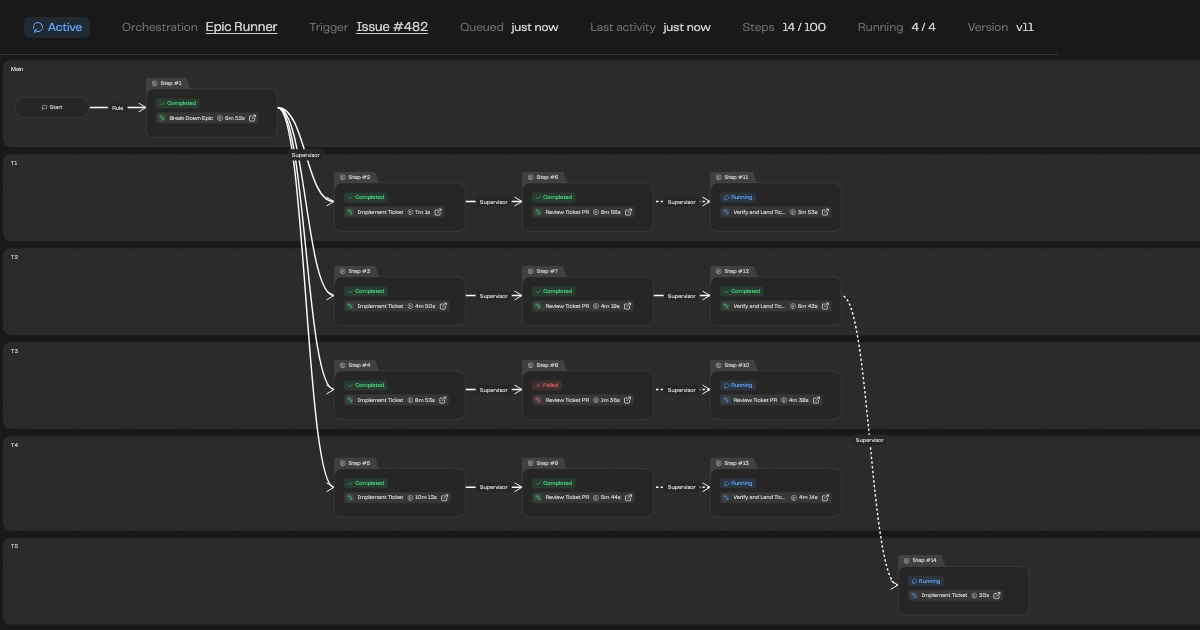
A trail reads well when things happen one after another. With four lanes it turns into an interleaved log. We kept Trail for the chronological story and added Graph for the question people actually ask of concurrent work: what is running, and why did it start?
Each lane gets its own named row, and Main holds work that has no lane. Connections trace the path from finished work to the work it started, and each one carries a badge saying who resolved that decision: Rule, Supervisor or Human. Active connections animate. A Join card says whether the instance is waiting for all or any of its steps and how many have ended. Repeated cycles collapse into a single Repeats card, so a lane that went around review three times does not take over the canvas. Select a card and the side panel shows its detail, including the step's brief and summary or the decision behind it.
We put the most care into that causal line. Knowing that step 28 ran matters less than seeing which step led to it and whether a person or the supervisor made the call. When something goes wrong in unattended work, that is the first thing you need.
What It Looked Like on a Real Project
We have been building Overcut with this for weeks. Our Epic Runner orchestration takes an epic from a root issue to reviewed pull requests, and here is one complete run, on a new service in our own product.
The epic broke down into 15 tickets, each in its own lane, with Max parallel steps set to 4. The instance took 62 steps, and 48 of them started while other work was already running. It reached the limit of four at once. Of its 59 decisions, the supervisor or a rule made 53 on their own. The other six were a person replying on the issue: to approve the plan, to land high-risk tickets, and to decide what to do when the last step got stuck.
Four of the 62 runs failed. One was a review in the middle of the parallel build that died before giving a verdict. The supervisor retried it in the same lane and the other lanes never noticed. The other three were the final step, which runs alone, when a checks runner kept getting killed. The supervisor retried it, then asked a person, and the fourth attempt finished.
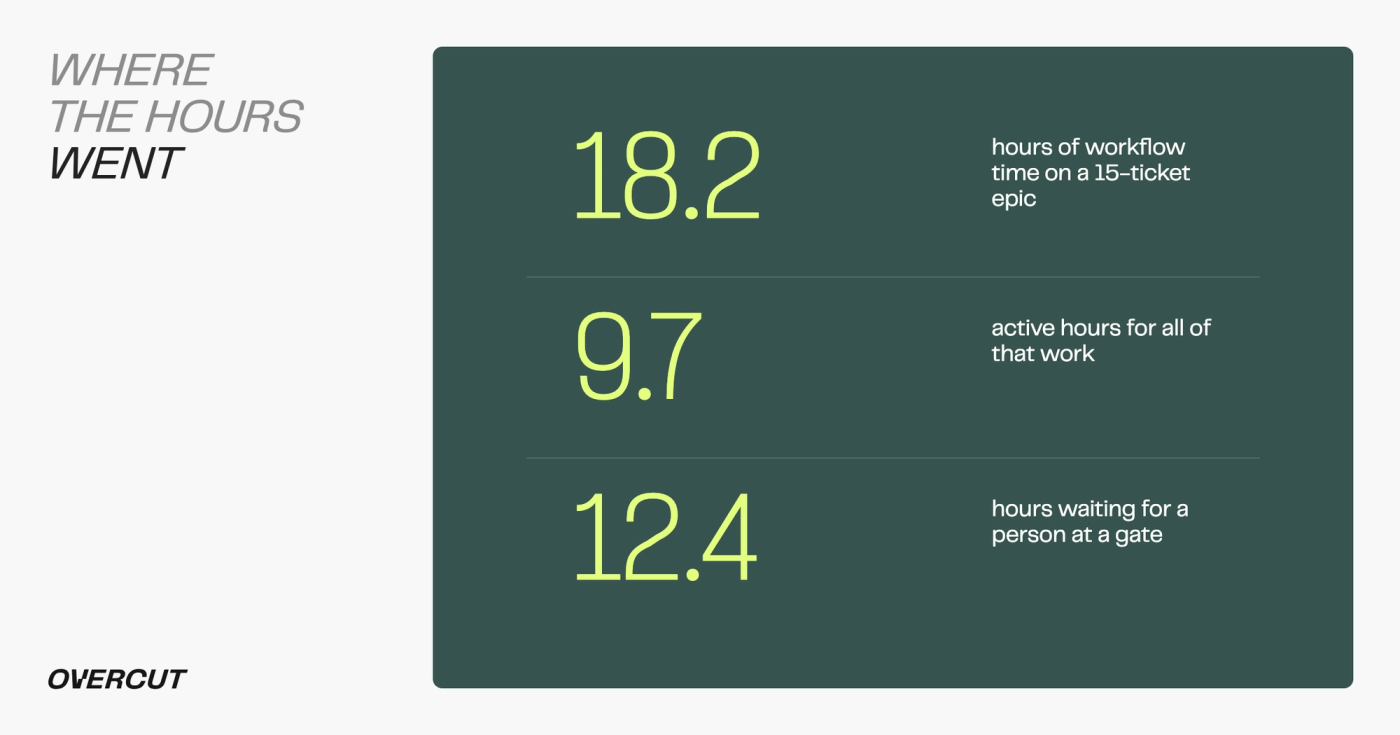
The result was 18.2 hours of workflow time in 9.7 active hours. The full run took 22.5 hours end to end, and for 12.8 of those nothing was running. Almost all of that, 12.4 hours, was the orchestration waiting for a person to answer a gate, including one nine-hour stretch overnight.
We would keep those gates. They sit on the plan and on high-risk landings, where we want a person deciding. But the number is clarifying. Once agents run at the same time, the slowest part of an epic is a person's reply, so it pays to be deliberate about which decisions really need one.
What Parallel Orchestrations Don't Do Yet
Five is a hard ceiling for one instance for now. Parallel steps also share your workspace's execution slots. Max parallel steps caps what an instance may run, but it does not reserve anything, so on a busy workspace a step waits for a free slot and starts when one opens. If several large instances run at the same time, plan capacity with that in mind, and use usage limits to divide it between teams.
Lanes organize work and do not resolve code conflicts. Two lanes that touch the same files can still collide when they land, so the split matters. Epic Runner handles this with explicit instructions: tickets land in an epic branch, and if the epic's final pull request shows failing CI, fixing it comes before starting more tickets. That is a pattern we wrote into our orchestration, and it is yours to adapt.
Parallel work also spends tokens faster, even when it costs the same in total. A per-run cap still protects each run, and a workspace budget still holds, but a burst of four runs reaches a daily budget sooner than the same four in sequence.
Where This Goes
This release also makes orchestrations more attentive to their work items. When an issue or pull request is closed, merged or reopened, the orchestration now hears what happened, who did it and when. Auto-close after idle ends instances nobody is coming back to.
We wrote when we introduced orchestrations that the point was to carry work from reported to shipped with people on the gates. Parallel lanes change the size of what you can hand over, from a ticket to an epic. The people stay in the same place, on the decisions that matter, and they now have one picture of everything moving underneath them.
FAQs
How many workflows can run at once? Up to five per instance. Set Max parallel steps in the orchestration settings. The default is 1, and existing orchestrations stay sequential until you change it.
Who decides what runs in parallel? The supervisor. It assigns lanes and chooses whether to wait for all steps or any of them. You steer it in Goal & Instructions, for example by saying that every ticket is a lane.
What happens when one lane fails? The other lanes keep running. The supervisor routes the failed lane according to your instructions, for example back to review, or it asks a person.
Does each parallel step use a workspace slot? Yes. Each running step uses one workspace execution slot. A step waits if none is free and starts automatically when one opens.
Do gates still work in parallel? Yes. A gate still stops the work it guards until a person answers on the issue, and the decision shows on the Graph with a Human badge.