Set Up Your Whole Software Factory From the Agent You Already Use

Most engineers who use a coding agent now spend a good part of the day inside it. The terminal session is where they read code, plan changes and ship them. Then they want automation around that code, an agent that reviews every pull request or triages every new ticket, and they have to leave. They open a web app, connect a Git provider, find the repository, read about workflows, pick one, and work out what to change so it fits a codebase the web app has never seen.
The coding agent already knows that codebase. It has read the test commands, the CI config and the contribution rules. It was the one place where all of that context lived, and it had no way to act on it.
So we gave it a way in. One command, npx overcut init, connects Claude Code, Cursor, Codex or any MCP-capable agent to Overcut. From then on you can tell that agent what your software factory should do on the repository you have open: review every pull request, triage every new issue, and investigate the bugs that triage finds. It reads the repo, installs each workflow in Overcut as a draft tailored to what it found, runs every draft on real work so you see the actual output, and publishes them when you say so.
Key Takeaways
npx overcut initsigns you in, detects the coding agents installed on your machine, and connects the one you pick. Claude Code, Claude Desktop, Cursor, Codex, Windsurf, VS Code, Zed and Gemini CLI are supported, along with any MCP-capable agent.- Tell your agent what you need, for example "Set up my software factory on this repo: code review on every pull request, triage for new issues, and root cause analysis on the bugs triage finds." It reads the repository, installs each workflow as a draft, tests each one on real work, and publishes them only after you agree. Ask it simply to set up Overcut, and it proposes one to three workflows that fit and starts with one.
- The workflows hand work to each other. Triage labels a bug for investigation, root cause analysis picks it up, and a high-confidence diagnosis can go straight to an implementation pull request. When you want that journey in one place, the agent can build an orchestration over the same workflows, with a goal, a supervisor that routes each ticket, and human gates where you want them.
- The agent can also check on runs, explain why one failed, and change workflows later, so the same session you code in becomes where you run the automation around your code.
- Everything runs as you, inside your workspace's permissions and audit trail. Git provider credentials never pass through the agent, and destructive actions need your explicit agreement.
The Context Was in the Wrong Place
Setting up automation for a repository is mostly a question of facts about that repository. Which branch is the default. Whether tests run with pnpm test or make check. Whether CI already runs a linter, so a review agent shouldn't repeat it. Whether contributors follow a template for pull requests. Whether commits reference Jira keys or GitHub issue numbers.
Overcut's agents already read the repository and its context when a workflow runs. They clone the code, look at the history and work out what they need. Building the workflow is a different moment, though. The person designing it benefits from the same facts, so the review step skips what CI already checks and the triage step knows which ticket keys to expect. A coding agent sitting in your checkout has those facts at hand while it builds, and it can fold them into each workflow before the first run. We moved the setup to where the answers already are.
It also matches how people actually work with agents now. Plenty of developer tools offer an MCP server so an agent can query a database or open an issue. Those connections give the agent a new tool. This one gives it a different job: building the software factory around your code, the agents that review, triage and investigate around the clock while you're doing something else.
What We Shipped
The setup starts in a terminal.
npx overcut initIf you have no session, the CLI opens your browser to sign in or sign up. It then finds the coding agents on your machine and asks Which coding agent should get the Overcut MCP server?, with an option to pick all of them. If you belong to several workspaces, it asks which one should be current. When it finishes, it tells you the next step: open your coding agent in a repository and ask it to "set up Overcut for this repo." For SSH and headless machines, npx overcut login --no-browser prints a URL and a code instead of opening a browser. The web app offers the same command under Connect your coding agent, and on the Build with your agent card, so you can copy it from there.
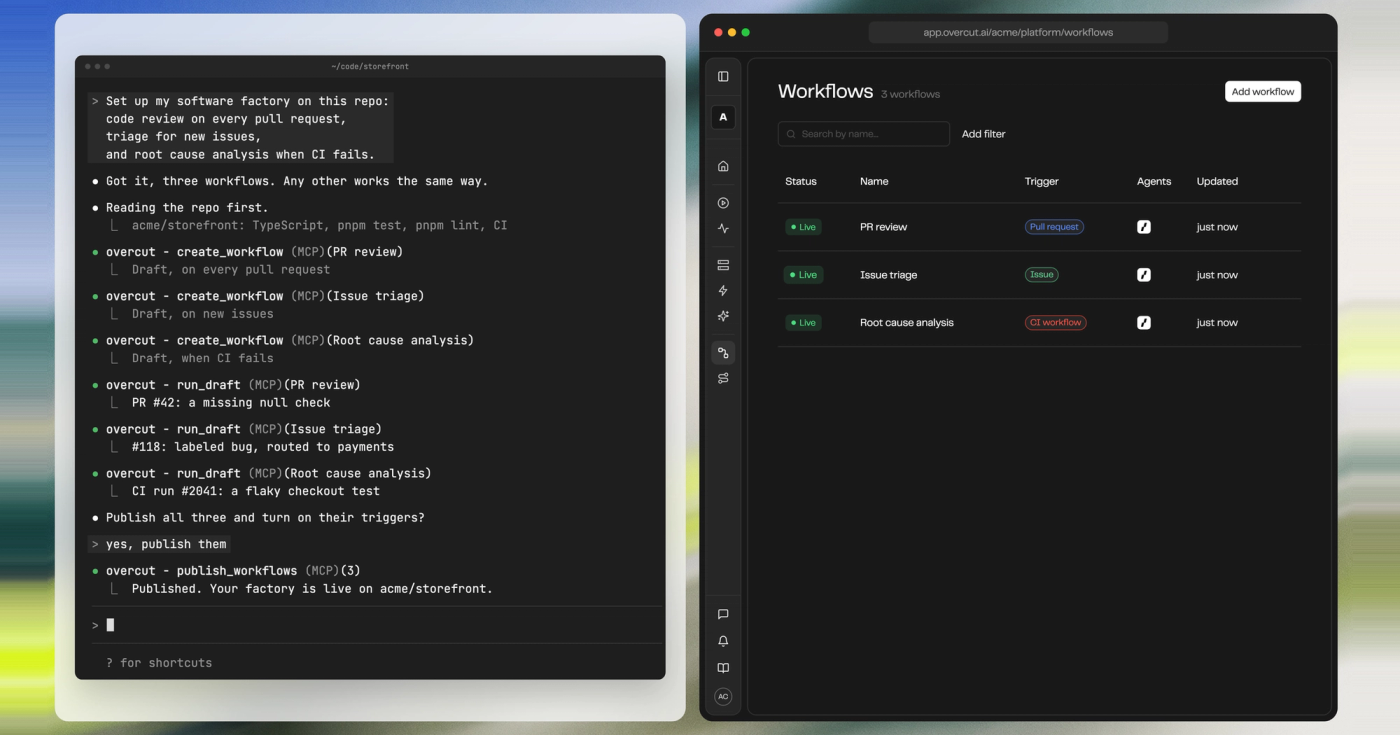
Then you open your agent in the repository and tell it what you want. You can be specific: "Set up my software factory on this repo: code review on every pull request, triage for new issues, and root cause analysis on the bugs triage finds." Or you can ask it to set up Overcut for this repo and let it suggest.
Either way, the agent loads Overcut's setup guide and inspects the repo first: the Git remote, the default branch, the language and package manager, the test and lint commands, the CI configuration, the contribution files and the ticket keys in recent commits. It picks the project, or asks you to choose one, or offers to create one. If your Git provider isn't connected yet, it gives you a link to connect it in the browser. It finds the matching repository and registers it, asking first if the match is uncertain.
Then it builds the workflows. Each one starts from a playbook or a workflow in your workspace library, so the agent is adapting a workflow we have already run on many repositories rather than writing one from scratch. It installs each one, tailors it with what it learned about the repo (the real test commands, the default branch, the ticket key pattern) and leaves it as a draft. If you didn't name any, it proposes one to three that fit, each with a reason tied to the repo, and starts with the one you pick. More can follow once the first is active.
Nothing goes live untested. The agent runs each draft on real work from the repository and summarizes what happened. These are real runs, so the review comments, labels and analysis land where your team will see them, and you judge the workflow by its actual output on your code. If a run fails, the agent fixes the obvious cause and reruns once before coming back to you. It publishes the workflows and turns on their triggers only after you agree, and tells you what will trigger each one and where to watch the runs. From then on, your factory runs in Overcut.
If the workspace already has repositories and active workflows, the agent doesn't start over. It summarizes what's there and asks what gap you want to fill.
Setup is only the first conversation. The same connection lets you ask why last night's run failed, what a workflow is waiting on, or to change a step in a workflow that's already active.
Workflows That Hand Work to Each Other
A reviewer on every pull request is useful on its own. The bigger payoff comes when workflows feed each other. Triage classifies a new issue and, for a bug, adds a needs-rca label. Root cause analysis picks that up and posts the likely cause with evidence, a suggested fix and a confidence level. When confidence is high, it comments /pr, and the Create PR from Design workflow opens the fix for your review workflow to check. A bug report can go from new issue to reviewed fix with no one picking it up by hand.
When you want that journey in one place, ask your agent for an orchestration, for example "take every new issue from triage through RCA to a pull request, and ask me before any code is written." An orchestration has a goal and a set of workflows it may use. A supervisor agent routes each issue between them, can send it back a step when new evidence turns up, pauses at the human gates you set, and records every decision. The agent builds it as a draft over the workflows it already installed and publishes it when you agree.
You don't have to build all of it on day one. Start with one workflow, watch it on real work, and add the next piece when you trust it.
Why the Agent Follows a Guide
The Overcut MCP server reaches more than a hundred operations: repositories, workflows, agents, secrets, orchestrations, runs. Handing all of them to a coding agent at once would fill its context with definitions it doesn't need for the task in front of it. So the server lists four tools. The agent searches for the operation it needs, reads that one schema, and calls it.
Tools alone aren't enough either. Knowing that register_repository exists doesn't tell an agent the right order for a first setup, or that it should test a workflow on real work before publishing it. So the server also offers step-by-step guides the agent can load, such as setting up a repository, designing a workflow, or working out why a run failed. When you ask for setup, the agent follows the same procedure every time, rather than improvising one from a list of endpoints. That's also why the experience is similar whether you use Claude Code or Cursor or Codex: the procedure lives on our side, not in each agent's habits.
Why You Stay in the Loop
An agent that can register repositories and publish workflows on your behalf is powerful, and we were deliberate about where its reach ends.
Everything the agent does runs as you. It has your permissions in the workspace, it uses the secrets and approvals already configured there, and every action lands in the audit trail under your name. It can't do anything you couldn't do in the web app.
The setup conversation doesn't upload your code. The agent reads the repository with its own file and shell tools, and the setup guide tells it not to send file contents to Overcut. Only its conclusions travel: the default branch, the test command, the fact that you use a pull request template. Once the workflows are active, they work on the repository the way any Overcut workflow does, through the Git provider connection you authorized.
It never handles your Git provider credentials. Connecting GitHub, GitLab or another provider happens in your browser, through the provider's own authorization, from a link the agent hands you. The setup guide tells the agent not to ask for secrets, and the docs tell you never to give it any.
Destructive actions are refused by default. If the agent tries to delete, deactivate or discard something, Overcut sends the request back until the agent asks you and retries with your confirmation. Publishing works the same way: the agent builds, tests and summarizes, and the workflows go live when you say so. The agent does the typing and the checking, and you make the calls.
The connection itself is scoped tightly. The CLI writes to each agent's user-level configuration, never to a file in your project, so the setup works across all your repositories and never gets committed by accident. Each connected agent gets its own API token, named for the agent and the machine. Running npx overcut mcp again rotates it, and npx overcut logout revokes the tokens on that machine and removes the Overcut entry from each agent's configuration.
Try It
Run npx overcut init, open your agent in a repository, and ask it to set up your software factory. Start with one workflow, read what it does on your next pull request or issue, and add the next link when you trust it.
FAQs
Which coding agents are supported? Claude Code, Cursor, Codex, Windsurf, VS Code, Zed and Gemini CLI, plus Claude Desktop. Any MCP-capable agent works: npx overcut mcp --print prints the configuration block to add yourself.
What do I need before I run it? Node.js 20 or newer, an Overcut account (or permission to create one when you sign in), a supported coding agent, and a local checkout of the repository you want to set up.
Which workflows can the agent set up? Anything in the playbook catalog or your workspace library, including code review, ticket triage, root cause analysis, Fix CI and Create PR from Design. If none fits, it can design a new workflow with you.
Are the test runs real? Yes. The agent runs each draft on real work from your repository, so review comments and labels are posted where your team will see them. That is how you see what the workflow will actually do before it goes live.
Does the agent need my GitHub credentials? No. If your provider isn't connected, the agent gives you a link and you authorize it in the browser. Never give credentials or secrets to the agent.
Can the agent delete things in my workspace? Only with your agreement. Overcut refuses delete, deactivate and discard requests until the agent asks you and retries with confirmation.
Is the connection stored in my repository? No. The CLI writes to the agent's user-level configuration only, so it is never committed with a project.
How do I disconnect? Run npx overcut logout. It revokes the tokens created on that machine and removes the Overcut entry from each agent's configuration. You can also revoke tokens under Workspace Settings → Security → API Tokens.